
Instagram Audio Download – Save Reel Audio as MP3
Paste any public Instagram Reel link and download Instagram audio in seconds. A free instagram audio download online — no sign-up, works on phone and PC.
Instagram Audio Downloader
Checking the link…
Longer Reels can take a few extra seconds.
Couldn't get the audio
- MP3 format
- No login
- Free
- Phone & PC
🎵 Convert your reels to music or background audio effortlessly
Works on iPhone, Android, PC & Mac — no login or signup required
100% Free
No Sign-up
Works on Mobile & PC
How to use
How to Download Audio from Instagram
Three quick steps — most sounds are ready in under a minute.
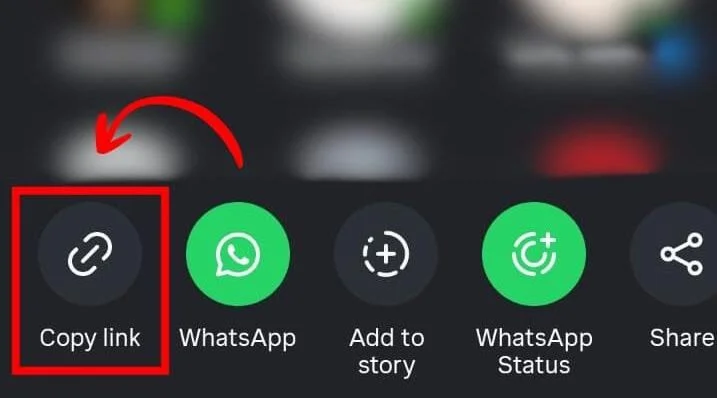
1
Copy the Reel Link
Open the Reel and tap the share icon to copy its link. Our instagram audio download by link works with public Reels, posts and videos.
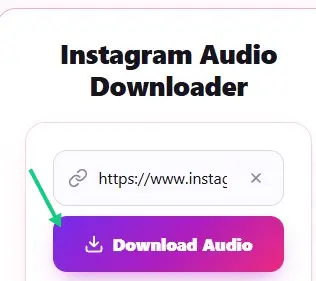
2
Paste It Into the Tool
Paste the link into the downloader box above and hit Download. No app or login needed — just download instagram audio straight from your browser.
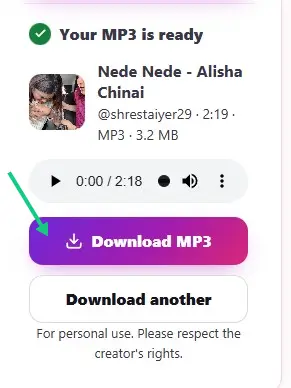
3
Download the MP3
Save the MP3 to your phone or PC. Your instagram reels audio download is ready in seconds — play it, share it, or use it in your edits.
Key features
Key Features
Everything you need for a fast, free instagram audio download — nothing you do not.
⚡
High-Speed Audio Extraction
Most links are processed in seconds — no queues, no countdowns, no waiting pages.
🎵
High-Quality MP3 Audio
A clean, high-quality MP3 — an instagram reels audio mp3 download you can play anywhere.
🎬
Extract from Reels, Videos & Posts
Instagram video to audio download made simple — grab sound from Reels, videos and posts.
🔒
No Login Required
Download without an account — instagram download audio the easy way, no Instagram login needed.
📱
Works on All Devices
Use it on iPhone, Android, PC or Mac — instagram video audio download works right in your browser.
💰
100% Free Forever
Unlimited audio download, Instagram sounds included — 100% free with no hidden fees.
Instagram Reels Audio Download – Save Any Reel Sound as MP3
Reels are where the music lives on Instagram. From trending sounds to original songs shared by creators, the audio on a reel is often the part you want to keep. Our instagram reels audio download tool lets you save any reel sound as a high-quality MP3 in seconds — whether it is a viral track you keep hearing, a funny voiceover, or background music from a travel video. An instagram reel audio download gives you the sound without the video attached, ready to listen to anywhere.
Unlike screen recording, which captures system noise and room sound, a proper instagram audio download extracts the original audio track directly from the reel. The result is a clean instagram audio download mp3 file that sounds exactly like the original — no hiss, no interruptions, no watermark. It is the fastest way to build a personal sound library: ringtones, motivational clips, podcast snippets, or tracks you want to identify later. And because everything happens in your browser, there is nothing to install and no account to create.
If you have ever wanted to download instagram reels audio for offline listening, remixing, or editing into your own videos, this is the simplest way to do it. Just copy the reel link, paste it into the box above, and your file is usually ready before the reel finishes playing.
How to Download Audio from Instagram by Link
You do not need an app, a browser extension, or any technical skill to download audio from instagram. The whole process revolves around the link — our instagram audio download by link system takes care of the rest. Open Instagram and find the reel, video, or post with the sound you want. Tap the share icon (the paper plane) and choose Copy Link. That copied link is all you need.
Come back to this page and paste the link into the downloader box at the top, then hit the download button. The tool fetches the reel, extracts the audio track, and prepares your MP3 in seconds. It is the same simple flow whether you want to download instagram audio from a reel, a story, or a regular video post — audio download instagram workflows do not get easier than this.
Because the tool works with links, it handles anything you can share a link to: a friend’s reel sent in a chat, a video embedded on another website, or a reel you bookmarked weeks ago. No Instagram login is required at any point, and we never ask for your password. For creators and video editors, this link-based approach is a huge time-saver — grab a sound, drop it into your editor, and keep creating.
Instagram Video to Audio Download on Any Device
An instagram video to audio download should work wherever you are — and this one does. The tool runs entirely in your web browser, so it works on iPhone, Android, Windows, and Mac with nothing to install. On your phone, copy the link in the Instagram app, switch to your browser, paste it here, and save the MP3 straight to your files. On a desktop, copy the URL from the address bar and do the same.
Every instagram video audio download produces a standard MP3 file that plays everywhere: your phone’s music player, iTunes, VLC, car stereos, and editing software like CapCut, Premiere Pro, or Audacity. The audio is extracted at a high bitrate, so an instagram reels audio mp3 download from here sounds crisp on earbuds and studio headphones alike.
There are no limits on how many times you can use it, no queues, and no file-size games. Because there is no app to update and no account to manage, it is also the easiest option on shared or work computers. If you can open a browser, you can convert Instagram video to audio here — and instagram download audio tasks that once needed desktop software now take seconds.
Why Use Our Instagram Audio Download Online Tool
Plenty of sites promise an instagram audio download online, so why use this one? First, it is genuinely free with no catches — no trial periods, no download caps, no premium tier hiding the best features. Second, it is private: we never ask you to log in, we do not store your links, and your downloads are never tied to an account.
Third, it is fast. Paste a link and your file is usually ready in seconds rather than minutes. And fourth, the quality holds up — the MP3 preserves the clarity of the original reel audio, which matters if you are reusing sounds in your own videos or simply want a clean listen. That combination of speed, quality, and privacy is why so many people make this their default instagram download audio tool.
One note on respect: only download audio from instagram content you have the right to use. Sounds from public reels are fine for personal listening, ringtones, and offline playlists, but check with the creator before reusing their audio commercially. Used responsibly, this free instagram audio download online tool is the quickest way to keep the sounds you love.
Ready to Download Your Favorite Reel Audio?
FAQ
Frequently Asked Questions
Is this tool free to use?
Yes. Instagram download audio is completely free on our site — unlimited downloads, no hidden fees.
Which Instagram links are supported for instagram reel audio download?
Public Reels, posts and videos with a shareable link. Private posts cannot be processed.
Is it safe to use?
Yes. The tool runs in your browser and never asks for your Instagram login or personal details.
Where do downloaded files go?
Your MP3 is saved to your device’s default download folder — on phones, check the Downloads app or Files.
Why can’t I download from a private Reel?
Private accounts restrict access to their content, so only audio from public posts can be fetched.
Can I use it on iPhone?
Absolutely — it works on iPhone, Android, PC and Mac, right in your browser. No app to install.
Do I need to sign up?
No. There is no account, no app and no sign-up — just paste a link and download.
What audio quality do I get?
You get a high-quality MP3 (192 kbps) — clear sound for music, dialogue and voiceovers.